
News
UVI Rumble complements your most trusted synths, but should it do more?
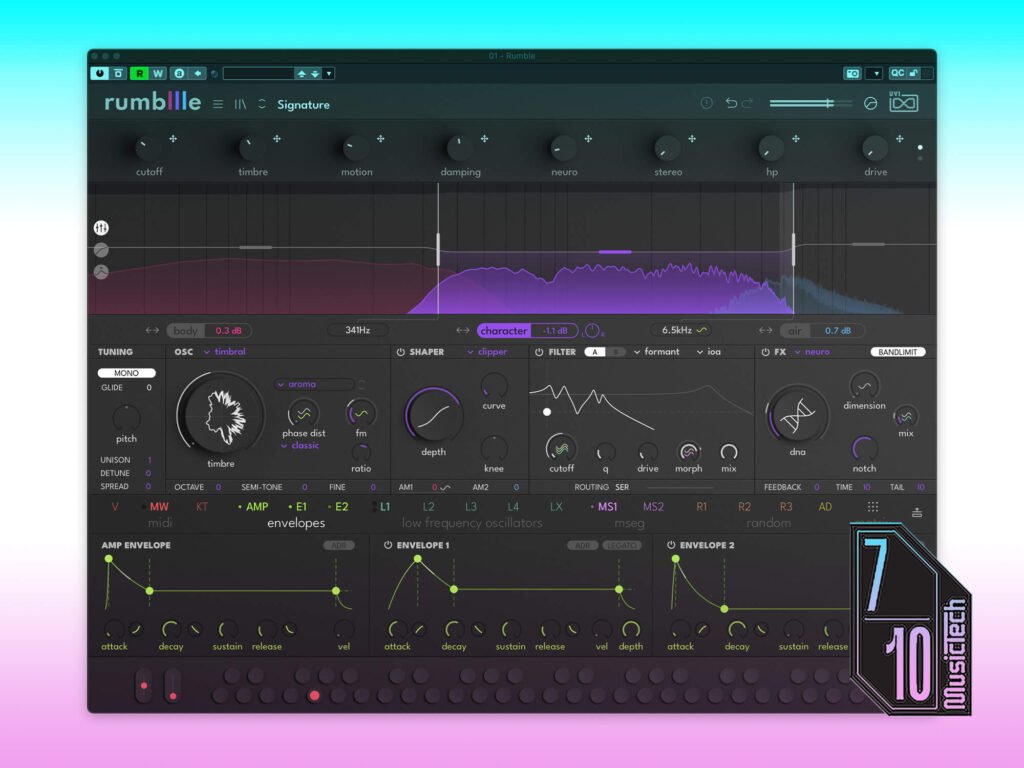

Rumble is a bold new member of the prestigious UVI family of software synthesizers. The French developer is known for its flagship synth plugin Falcon and an impressive range of sample-based instruments, analogue-modelling synths, and effects. Rumble is a brave new venture into a multiband synthesis concept inspired by modern production workflows.
The design cleverly uses Rumble’s three sound layers across the frequency spectrum with two adjustable band splits dividing the lows, mids, and highs. This allows you to build complex, composite sounds, with the flexibility to reshape the individual layers and expand each one across the entire spectrum, depending on what suits your production.
Created with ex-Native Instruments designer Efflam Le Bivic, Rumble looks both intriguing and somehow familiar at the same time, with intelligent use of symbols and superb attention to detail. Once you move on past its dashing good looks, Rumble is a creative instrument that is refreshing to use, and although it can sound like it in a few moves, it’s not trying to be vintage in any way.
The Rumble in the…
Because Rumble’s workflow revolves around switching between its three layers, it makes sense that all controls are accessible in a single-screen interface. This is achieved in fine style, and as you move from one band to the next, the respective Oscillator, Shaper, and FX sections change to reflect the settings of the body, character, or air band you’ve selected.
As you work your way through the patch library’s 10 distinctive categories, a simple workflow becomes apparent that allows you to mute the bands you don’t require as you populate your track with sounds. Automation is made easy, with the patch-specific macro controls that range from basic filtering and effects sends to complete timbre transformation.
Before you dive into more advanced editing of the individual layers, you can set the two crossover points, choose between eight different multiband compression modes, and adjust a four-band EQ. The EQ follows the same production-friendly workflow, letting you treat and shape the entire sound with the purpose of fitting it into your mix. Each band can also be soloed, so you can focus on the finer details of the layer before hearing it in context.
There is a wide range of sound generation and shaping tools, including nine different oscillator modes ranging from virtual analogue and samples to kick drum membrane modeling, wavetable, and FM engines. Then, there are 10 shaping modes, with various clipping, wavefolding, and ring modulation algorithms, as well as a global dual-filter section with six filter types.
Meanwhile, a choice of ten different effects can be applied on a global or per-layer basis, which means you can use one effect for each band or a chain of three effects over the entire sound. Each of these macro effects processors is also linked to a separate feedback loop, which gives it the ability to self-resonate, which is ideal for creating tonally rich distortion effects.

UVI Rumble’s deep, dark underbelly
When you peruse Rumble’s modulation controls for the first time, the interface actually resembles a household synth plugin like Pigments and presents a vast array of ways to manipulate the various parameters. To design the way your MIDI keyboard interacts with Rumble, the velocity and keyboard tracking features can be mapped with nodes on a graph. This allows you to orchestrate the sound around your performance approach, which appears useful for commercial music or motion picture scoring.
For detailed shaping, three envelopes have curve controls for the attack, decay, and release parameters, and there is a one-shot mode for drum synthesis applications. In addition, there are four basic LFOs with individual routing and a quad LFO mod source that uses the sum of all four LFOs. Then, there are two multi-segment envelopes with a range of preset shapes and patterns, and the ability to save and recall your own custom settings. There are also three random generators with three operating modes, an analogue drift module, and an extensive mod matrix that gives you a complete overview of all your modulation routings.
While Rumble’s modulation section sounds intimidating, it’s actually really easy to find your way around. As you click and hold on a mod source, the interface lights up with all the potential destinations, which is both a practical and aesthetically pleasing touch. Also, if you don’t want to move past basic envelope shaping, more complex modulation sections are conveniently hidden from view, which avoids confusion, and the modulation panel can be collapsed for a streamlined look.
Rumble’s powerful sound creation platform is not particularly resource-economical, however, and I struggle to run it smoothly on an M2 MacBook Air with 8GB RAM. Regardless of what spec UVI states as the minimum, I recommend running an Apple Silicon MacBook Pro with at least 16GB RAM, or you simply won’t enjoy the experience, as there will be latency at every turn, and loading patches will become laggy.

Can UVI Rumble replace your favourite synth?
Releasing a synth plugin that is intended to be used monophonically for the most part is an incredibly brave move, but the UVI sound design team has really done itself proud, with a phenomenal sound library that can inspire you in so many creative directions. However, Rumble’s adaptability and polyphonic mode allow you to use it for so much more than just leads and bass.
Rumble has an incredibly producer-centric workflow, but it also offers far more sound design potential than most plugins marketed as bass synths. The multiband approach has been executed to perfection, with just the right parameters available on a per-layer and global basis, providing an impressive balance of micro and broad spectrum sound manipulation.
Rumble has been created for the workflows of producers in modern EDM and commercial music genres, but the flexibility of the multiband platform allows you to turn a lead into a pad in a few clicks. One could argue that it lacks extensive effects racks and sequencers like Pigments or Serum, but this would alter the cohesive single-screen interface, turning Rumble into something else.
As amazing as Rumble is as an instrument, its $199 price tag does let it down, because it simply isn’t in the same league as Arturia Pigments, which is already a well-established part of our musical landscape.
If UVI had made Rumble just $50 cheaper, it would have made it an exciting new prospect. However, as things stand, it remains a complement to the mainstay synth plugins like Omnisphere, Serum, and Pigments, rather than a complete replacement.
Key features
- AU, AAX, VST3, standalone. NKS compatible.
- 3-band synthesis engine
- 9 different Oscillator Modes
- Dual filter section with 6 filter types
- Preset library with 500 patches
- Per-band waveshaping with 10 shaping modes and 10 effect types
- Deep modulation
- Multiband compression and EQ
The post UVI Rumble complements your most trusted synths, but should it do more? appeared first on MusicTech.