
News
I tested 9 of the best stem separation tools. Here’s how they compare
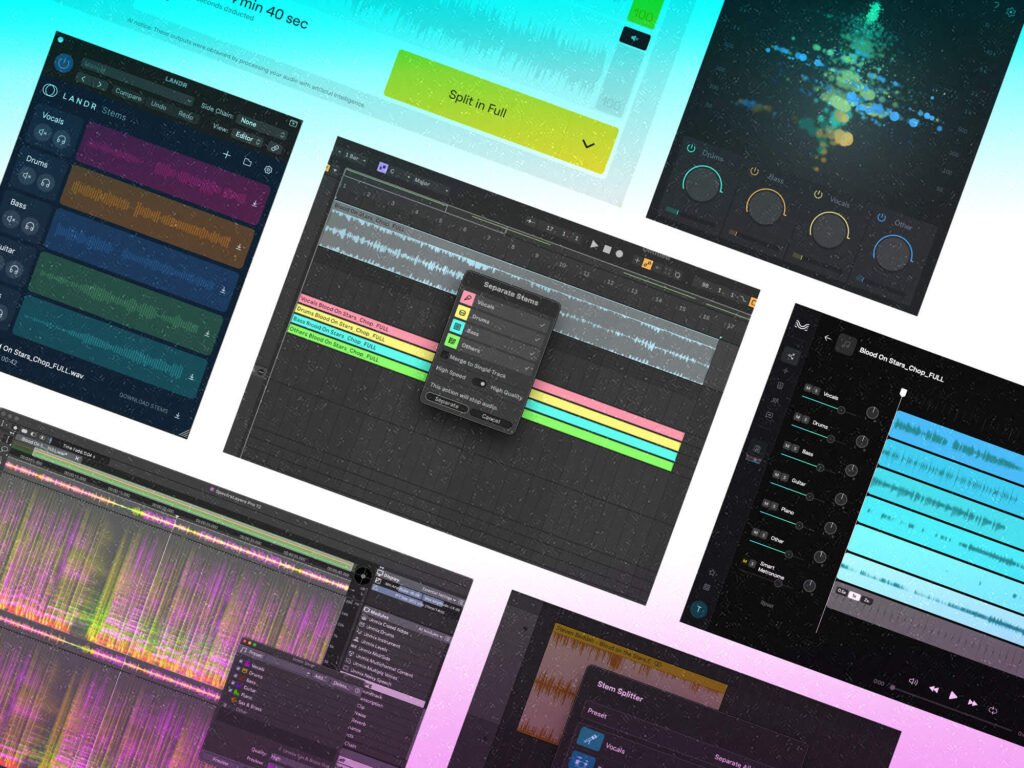

Stem separation has been a fascination in the audio world for a long time now, with the end goal of splitting a mixed track into separate parts without any noticeable glitches or audio artefacts. A few years ago, it felt like the stuff of science fiction, but more powerful computers, access to machine learning datasets and AI have turned it into a reality that’s only getting better.
As each year progresses, there seem to be improvements in both separation quality and in the number of specific instruments that the AI can isolate. But which one is best for you?
I’ve picked 9 coveted tools to test from LANDR and Ableton Live 12, to Lalal.ai and SpectraLayer Pro. To find out which gives the cleanest-sounding results, I’m using the track Blood On Stars by Steven Beddall (courtesy of artlist.io), and splitting the stereo track into individual component parts.
Best stem separation software at a glance
- LANDR
- Ableton Live 12
- Steinberg SpectraLayers Pro 12
- Lalal.ai
- Gaudio Studio
- Moises
- zPlane Peel Stems 2
- Logic Pro
- MVSEP
In all cases, the highest-quality configurations were chosen on the software. These examples should give you a rough idea of the stem separation quality, but the results can vary from track to track. It’s possible that one algorithm may perform slightly better than another when fed a certain audio file, but the results could be reversed with a different track.
Here’s a list of things to try and listen out for when comparing the results:
- Do any other instruments leak between stems at any point?
- Are there any timbral changes? Does the algorithm get confused with other instruments and take some information away?
- Are natural reverb tails included?
- How does it handle backing vocals?
- Are there any additional artefacts like metallic whistles, glitches, hiss or phasing issues?
Which stem separation software is the best?
After carefully analysing the vocals, drums, bass and other instrument stems, and cross-referencing with a bunch of other examples, I find the results vary quite a bit.
I’d like to say there’s a definitive answer as to which one sounds best, but the truth is there are variations from track to track, and some are better at certain instruments than others. At this level, all of these tools generally sound pretty decent and relatively clean. If stem separation is something that you do often, then it may be worth having access to more than one service so that you can experiment to get the best results for your material.
Moving forward, I plan on using Logic Pro’s built-in separation for most musical parts due to its ease of use, and then using MVSEP for more critical instruments and vocals, as it has the most up-to-date algorithms.
The results for the vocals are all fairly close between Logic, LANDR, Gaudio and Lalal. Moises and Ableton have a very slightly more aggressive separation that gives the vocal more space around it, but it also means the reverb tails are slightly less even.
The best, however, is MVSEP (bs_reformer_mt_81_vocals algorithm), thanks to its extra of smoothness and consistency.
There can sometimes be a large variation in the drums depending on how hard the algorithm is set to separate just the main drum instruments. Gaudio, for example, is set very loose so it picks up more room sound and vibe than some of the others, but that means it sometimes sounds messy. SpectraLayers and PEEL Stems are also a little messy, but the standout in terms of transient punch and consistency is LALAL.ai.
The bass also varies significantly and depends on how much brightness is present alongside the amount of transient attack sound. LANDR performs best here, closely followed by LALAL.ai.
Many of these tools now offer stems for Other, Piano and Guitar separately. This is where some of them really start to struggle as the algorithms can’t quite decide which stem type to place certain elements. Logic is a standout here, with MVSEP being the cleanest and best at identifying the different parts.
What do you think? Have a listen to the files and see which you think sounds best. Each option has different pros and cons, including processing speed, price and workflow, so the final decision isn’t necessarily black and white. Different tracks could result in a different leaderboard. For the most part, sticking with the separation in your DAW is fine for most tasks due to the benefits of the fast workflow. Then you can branch out to other systems if you need improved quality for things like vocals. Whichever one you go for, we can all agree at least that the technology is mind-blowing — and it’s only going to get better.
Note that you should always respect the copyright of any original material you use these tools on. Also, some of these tools will process the audio using their own servers, so an internet connection is required and the waiting times can vary. If you’re running the separation locally on your computer, then having a better quality graphics card may give you faster results.
Stem separation software available in 2026
LANDR

LANDR started off as an online mastering service, but has grown into a full suite of tools and resources for music creation, production and distribution. These include LANDR’s own Mastering plugin, FX Suite, Synth, Sampler, new AI composition tools and more, alongside a large range of software from 3rd party developers, plus a full distribution service.
You get access to the LANDR Stems plugin as part of the monthly subscription plan, which lets you split your audio into vocals, drums, bass, guitar and other stems. Although these options are a little limited compared to the competition, it’s powered by AudioShake’s award-winning AI algorithms that are used by major labels, publishers and sync companies.
Price: £16pm Standard, £20 Pro (discounts for annual subscription)
VST3, AU, AAX plug-in
Separation options: vocal, drums, bass, guitar, other
https://www.landr.com/
Ableton Live 12 Suite

Arriving late to the party, Ableton finally added stem separation to Live in version 12.3. Since then, there’s been an update that lets you process specific time selections in Arrangement View, remove specific stems and combine the rest into a single track.
It’s powered by Music AI, the creators of Moises. You simply right-click and select “Separate Stems to New Audio Tracks”, then choose which stems you want and whether it’s High Speed or High Quality mode. It’s only available in Live Suite, so arguably the most expensive option here, but you also get a beast of a DAW to go with it and a fast incorporated workflow.
Price: £599 Live 12 Suite (rent-to-own available)
Standalone DAW
Stems: vocals, drums, bass, other
www.ableton.com
Steinberg – SpectraLayers Pro 12

SpectraLayers is an editing and restoration powerhouse that lets you sculpt audio on a spectrograph display, and also features AI-assisted processes to help perfect your sound.
You can unmix tracks into stems, and then further split these into component parts such as individual drum instruments. The beauty here is that you can then edit the results using an array of tools to get cleaner finished audio, or to go wild with sound design. There’s even a tool called Unmix Instrument that lets you learn the sound of a solo instrument and then isolate it from a busier part of the track.
ARA2 support means it can run directly on the timeline in Cubase, Nuendo or any other ARA2-supported DAW. The cheaper Elements and Go editions feature vocal extraction, but you’ll need the full Pro version to get full track splitting and all the tools.
Price: £290
Standalone, AAX, ARA2 Plug-in
Separation options: vocals (lead and backing), drums (kick, snare, toms, clap, hi-hat, ride, crash), bass, guitar, piano, sax & brass, other
https://www.steinberg.net/
Omnisale – Lalal.ai

Lalal comes as both a web-based and desktop/mobile stem separator app, plus as a real-time VST/AU plugin. You can try several files for free, or choose from a range of subscription options or one-off fees.
The latest version is based on a state-of-the-art, in-house developed neural network called Andromeda, which is built on six years of research and innovation, and trained on 4x as much data as the previous version.
Currently, you can extract a large list of instruments, including vocal and backing vocal separation, strings, wind and acoustic or electric guitars. The real-time plugin version runs a surprisingly clear-sounding, lighter algorithm, but doesn’t require Internet access.
Lalal has also added a Voice Cleaner, Voice Changer, Voice Cloner, Echo & Reverb Remover and Lead/Backing vocal splitter features.
Price: Free, £84 yearly, or £10 per month subscription, or £42 for 750 minutes (other options also available)
Online, Desktop App, Mobile App, VST plug-in
Stems: vocal and instrumental, vocal and noise, drums, bass, piano, synthesizer, acoustic guitar, electric guitar, strings, wind, plus lead & back vocal splitter
www.lalal.ai
Gaudio Studio

Gaudio Studio uses the Gaudio Source SEParation (GSEP) model to separate audio into Vocal, Drums, Bass, Electric Guitar, Piano, and Other Instruments, with more options promised for the future. The website also features a Vocal Remover that uses a higher-quality vocal algorithm, and a Noise Reduction option. It all works via the website, but there’s also a mobile app version.
You can try out 20 minutes of audio for free with an MP3 format output, or if you upgrade by buying bundles of minutes, then you get the option of a fast track service and Wav files.
Price: $7 for 50 minutes, $16 for 200 Minutes, $79 for 1200 minutes
Online, Mobile App
Stems: vocal, drums, bass, electric guitar, piano, and other
https://studio.gaudiolab.io
Moises.AI

Moises comes as a slick web application, plus a desktop and mobile app. The pro version lets you separate audio into vocals (with separate backing vocals), drums (including individual elements), bass, guitar, background vocals, piano, keys and strings, making this a versatile option. It also has the ability to separate multimedia tracks into dialogue, soundtrack and effects.
If you want to enhance your workflow, then there’s a Stems plugin available as part of the Pro Plan. There is also an AI Studio that can generate new stems, and Voice Studio and Mastering plugins coming at some point in the future.
The free Starter plan will get you 5 audio separations per month, with the other plans offering unlimited separations, higher quality and a host of bonus features. Moises also updates its algorithms fairly regularly, and they’ve just announced a partnership that makes Moises tools available inside the Fender Studio DAW.
Price: Free, £4.99pm Premium, £24.99pm Pro (discounts for paying annually)
Online, Desktop app, mobile app
Stems: vocals, backing vocals, drums (with separates), bass, guitar (acoustic, electric, lead, rhythm), background vocals, piano, keys, wind and strings
www.moises.ai
zplane – Peel Stems 2

The newly released Peel Stems 2 is the only option here that works as a plugin in real-time. It’s powered by the latest version of zplane’s proprietary real-time stem separation technology.
Processing latency has been reduced down to 245ms at 44.1kHz and the separation quality and clarity have been improved from the previous version. You get volume and mute controls for the vocal, drum, bass and other stems with an Isolation slider to refine the separation. You can also use a Focus EQ to hone in on specific frequencies.
In terms of out and out quality, a real-time tool will never compete with offline AI processing. However, it’s impressive what this plugin can achieve at such a low latency, which could open up options for quick track rebalancing, or unique live performance tricks.
Price: €59 (€19 upgrade from Peel Stems V1)
Real-time VST3, AU, AAX Plug-in
Stems: vocals, drums, bass, other
https://products.zplane.de/
Apple Logic Pro 11.2

Apple introduced stem separation to Logic a couple of years ago, and has since improved the audio quality and added the ability to separate piano and guitar. You can right-click on any audio region and then choose which stems or collection of stems you want. It’s a feature that uses the grunt of the Apple Silicon chips, so it’s only available for more recent computers. However, the offshoot is that it’s incredibly fast to process.
As Apple is always incredibly tight-lipped about what goes on behind the scenes, it’s unlikely we’ll ever find out exactly what models and libraries they’ve been using. The ease and speed of having it built into the DAW workflow cannot be understated, though.
Price: $199 (Stem separation requires Apple Silicon chips)
Standalone DAW
Stems: vocals, drums, bass, other, guitar, piano
www.apple.com
MVSEP

If you want to tinker with a range of different models, then you might want to check out MVSEP.
The website can seem a little daunting at first, as it has long lists of multiple algorithms alongside quality scores for different aspects of the separation. If you’re serious about separation though, then this is where you’ll find some of the most cutting-edge tech, including new and experimental algorithms that can do things like separate a choir into bass, tenor, alto and soprano, or split drums into individual parts.
There’s a free version that gives you 50 separations a day, but be sure to sign up as it upgrades you to WAV downloads. Alternatively, you can pay for credit bundles that unlocks the daily cap and adds batch processing and queue priority. An honourable mention also goes to Ultimate Vocal Remover 5, which offers a similar list of algorithms and runs as a free app on your computer.
Price: Free, or $10 for 600 credits (roughly equates to minutes)
Online
Stems: vocals, bass, drums, other, plus too many other options to list
www.mvsep.com
Why You Can Trust MusicTech
MusicTech reviews hundreds of new products every year, from powerful synthesizers, DAWs and pro plugins through to everyday headphones and portable speakers. Our expert reviewers are producers, engineers and enthusiasts with hundreds of years of collective experience, with a keen ear to the ground on new trends and technologies.
Every guide on MusicTech is created by a producer, musician and tech enthusiast just like you. We understand what you’re looking for when searching for a new stem separation tool, and we want to ensure you purchase genuinely useful products for your craft. So you can guarantee that every product MusicTech recommends to you is a product we’d be happy to have in our studios.
Check out more music and audio gear buyer’s guides on MusicTech.
The post I tested 9 of the best stem separation tools. Here’s how they compare appeared first on MusicTech.