
News
Here’s how to document your music memories with Spotify’s new User Notes feature
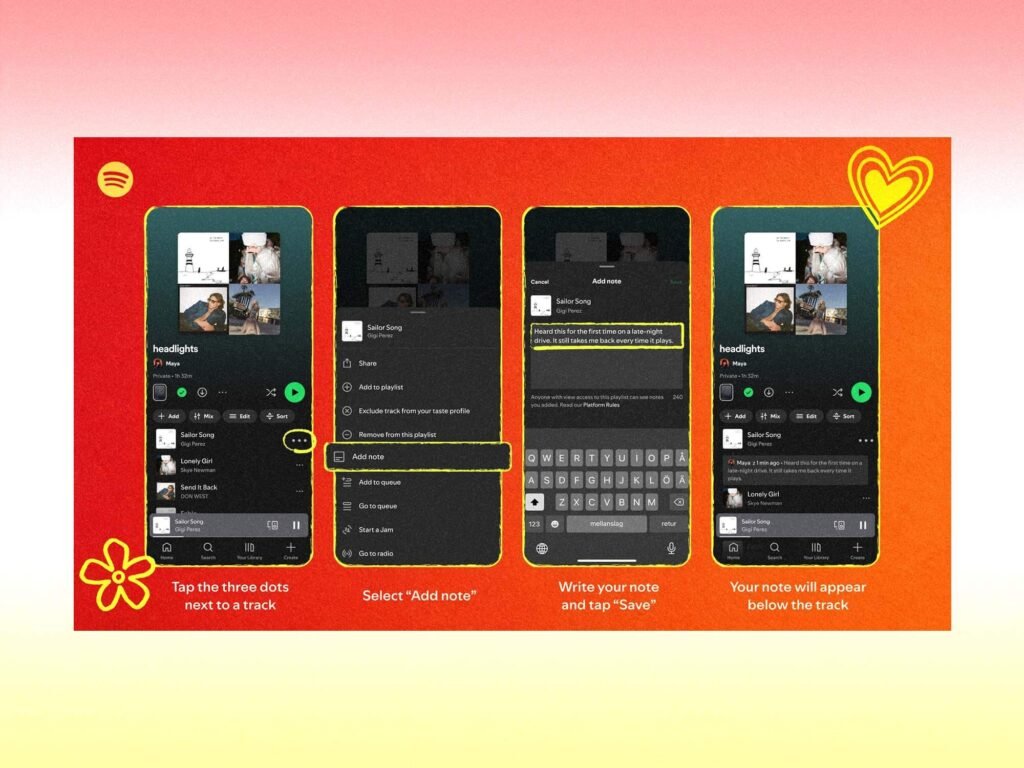

Spotify has rolled out a new User Notes feature for both free and premium users in select markets who are 16 and older.
With User Notes, you can now add your own notes and captions to playlists you’ve created or manage as part of Spotify’s mission to make music discovery and the listening experience more personalised.
In an email shared with MusicTech about the launch, a summary states: “Think of it as adding a personal caption to your favourite songs: a place to share why a track made the playlist, when you discovered it, a hidden gem worth remembering, or the memory behind it. Over time, these notes paint a picture of the music listeners love and the moments that shaped it.”
To use the feature on mobile, go to any playlist you’ve created or added tracks to, and tap the three-dot menu button next to a track. From here you can select ‘add note’, then type out your own message – it could be a memory or extra context as to why you chose the song – and hit Save.
Your note will be visible to anyone who can see the playlist, with your name linking to your profile.
In other new launches for Spotify, the streaming service has also launched a new Running Mode. Offering a “personalised running experience”, it transforms playlists into running sessions tailored to fitness goals, music taste, and tempo.
A blog post on the Spotify Newsroom says users can find Running Mode in the Fitness Hub, where you can choose one of 25 curated running presets and make it your own by customising your workout type, duration, Beats per Minute, and what type of music you’re in the mood for. It also includes optional audio cues in English to help guide you through your workout.
Find out more about the latest Spotify launches via the Spotify Newsroom.
The post Here’s how to document your music memories with Spotify’s new User Notes feature appeared first on MusicTech.