
News
Steinberg SpectraLayers Pro 13 is an excellent value spectral editor

£298
Updates from £75
(Also available in Elements edition: £75, updates from £29)
steinberg.net
Following its 2019 acquisition of SpectraLayers and inaugural V6 release of the software, Steinberg has lavished much of its development efforts on the app’s roster of processing modules. Often this has taken the form of adding new machine-learning (ML) processors, and giving an ML retrofit to those modules that can benefit from it.
This makes sense given the rapid advances in ML technology and the impressive functionality it enables, but has arguably come at the cost of improving SpectraLayers’ workflow and actual spectral editing. A quick glance at SpectraLayers 13’s release notes, though, shows that many of its updates are aimed precisely at these core fundamentals. There are a few module additions and improvements, of course, but no honing of the existing ML datasets. I need a closer look to see if this makes for a worthwhile update.

Flexible feathering… finally!
Spectral editing borrows some ideas from image editing apps. It’s just that the image in question is a spectrogram rather than a photo of your cat. A good example of this is selection feathering, where the edges of a selected area are faded to help the results of any editing blend with the surrounding content.
SpectraLayers has long allowed control over both X-axis (time) and Y-axis (frequency) feathering via sliders that are shown when a marquee (selection) tool is active. Annoyingly, though, these needed to be set prior to making a selection – if you wanted to change an existing selection’s feathering, the only recourse was a pair of fiddly and awkward mouse tools to soften or sharpen the feathering.
Although a small change in and of itself, then, I’m stoked that SpectraLayers 13 can adjust an existing selection’s feathering using just the X and Y sliders, not to mention the ability to quickly enable or disable feathering altogether. The old selection softening and sharpening tools are still here and have their uses, but the sliders are much more precise and much easier to use.

Spectral editor streamlining
Another small workflow change that brings an outsized benefit is that selections can now be adjusted by dragging their corners – not perhaps a major difference from only being able to drag selection sides to resize, but it saves a few moments and makes editing feel more fluid.
This streamlining continues with Paste Into Selection, which crops the content of the clipboard so that it fits within a target selection (if the target selection is larger in either dimension than the clipboard audio, the excess area is filled with silence). Similarly, ‘Paste Insert’ is a massive timesaver, placing clipboard contents at the cursor position and moving subsequent audio rightwards to make space. Both of these new paste modes are infinitely more convenient than the awkward multi-step procedures needed to achieve the same results previously.
Finally, selection changes can now be excluded from SpectraLayers’ undo history. This is useful in workflows where you hone selections while experimenting to find the best processor configuration, and so want only to undo and redo changes to those processor settings, so it’s a handy option to have. Unfortunately, the implementation misses the mark, being presented as a program preference that completely disables and deletes all selection history when enabled. It would be far better as an on-the-fly option that simply omits or includes selection changes in undo/redo requests.

What processor additions and improvements are there in SpectraLayers 13?
A new-for-13 Voice DeClick module senses for and reduces tongue clicks, lip smacks, and other mouth noises that mics have a habit of accentuating. There’s a definite need to balance the strength of reduction against a commensurate loss of high-frequency detail but, with the sweet spot found, the module does an excellent job of eliminating these icky organic noises without leaving a patina of processing in its wake.
Voice DeCrosstalk and Unmix Two Voices share the same underlying ML-based sensing to rebalance or separate, respectively, dialogue containing two voices. Both modules identify a ‘primary’ voice based on whether it’s the first to talk, the loudest, or the one that talks for the longest, regarding everything else as the ‘secondary’ voice. Analysis and processing of both modules is on the slow side, but I’m exceptionally impressed by the accuracy and cleanness of the results.
Unmix Sound Effects separates long-term background noise—crowd noise, wind, traffic, etc.—from ‘spot’ sound effects such as door slams and footsteps. This is a significant processing challenge given both sources will typically consist largely of noise, and this is reflected in the various parameters exposed by the module for tuning its processing. Results are respectable given the challenge but, even so, I don’t find them to be outstanding, although much depends on the source material.
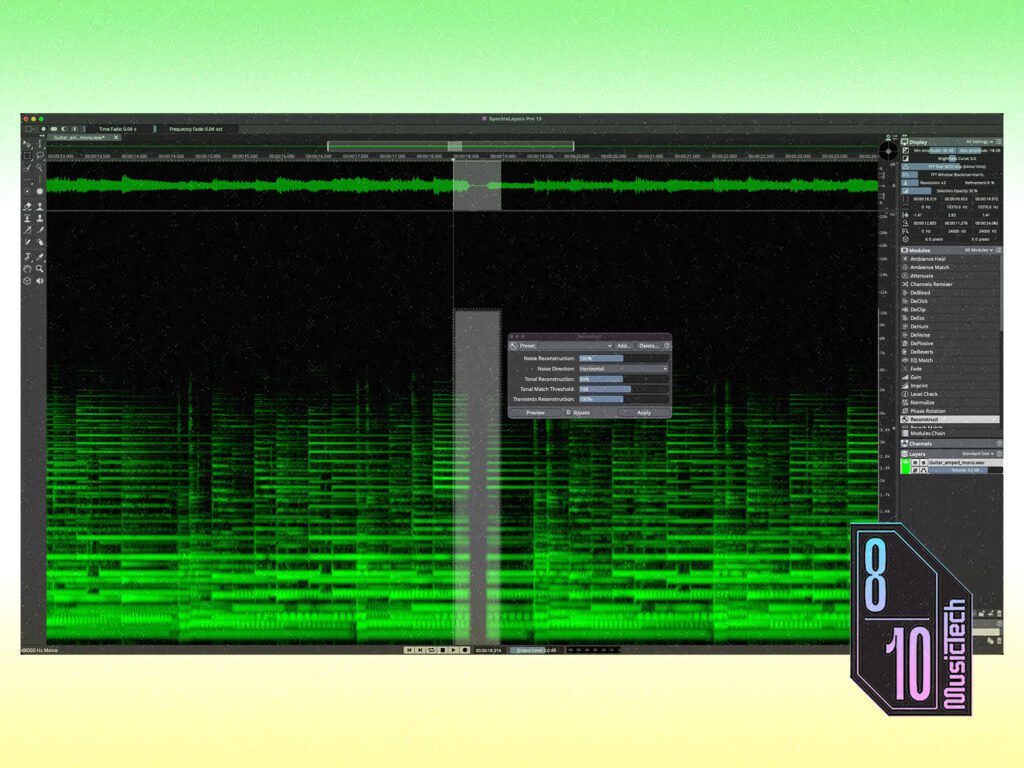
Reconstruct replaces the old Heal function, fixing short gaps and dropouts by analysing the surrounding audio and extrapolating from this to fill the gap. Again, the effectiveness depends on the source material. In some cases, its ability to recreate audio that isn’t there is near-magical. In others it seems to get confused, linking harmonics from the left of the gap with different harmonics on the right, even where the harmonics on either side of the gap match. It’s an interesting effect, but not the one being aimed for!

I’m dubious about Ambience Heal, whose job is to fill the spectral gaps left in background noise/ambience after a component—a voice or instrument, for example—has been separated from it. It does its job well enough; it’s just so specialised in its use-case that I can’t envisage ever needing it.
More widely useful are the Attenuate, Fade and Level Check modules. The first reduces the intensity of the audio within a selection based on the surrounding audio – perfect for dealing with ‘hot’ notes and resonances. Fade makes it easy to apply standard fades and crossfades directly within SpectraLayers, something that previously required volume automation or fiddly editing. And Level Check provides a detailed readout of your audio’s statistics, including vital true peak, RMS and loudness measurements.
Finally, mention must be given to the DeNoise and Unmix Components modules, both of which have been improved. The former, which was already an excellent performer, has gained additional parameters to smooth and hone the processing – particularly helpful when dealing with ultra-noisy sources that need a lot of reduction strength to be applied. The latter has been tweaked to give better recognition and separation of tonal, transient and noise components of audio.

Do I need SpectraLayers Pro 13?
Alongside all these updates are a handful of quality-of-life improvements. Open project tabs can now be added to batch processing jobs (previously only project files could be added), and this works hand-in-hand with the overhauled Pro Tools AudioSuite Bridge Plugin that can now handle multiple source clips simultaneously. It also allows exchange of Ambisonics and multi-channel audio (up to 9.1.6 configuration), and to support this the app can now work with audio devices with more than 128 channels.
Is all of this worth the update price or, indeed, the full outlay?
Updates are well-priced, although with many of the most popular tools not having been updated from v12 (in particular musical stem separation), some users may decide to sit this one out. Those who make deeper use of the app’s editing tools and processing modules, though, will find plenty of value in the improved workflows and updated roster of processing modules.
As for full licenses, when pitting SpectraLayers Pro 13 against its closest comparable competitor, iZotope RX 12 Advanced, there’s very little to choose between the two, and certainly nothing that I see as justifying RX’s additional £1,001 of asking price. RX Standard is a closer price match, but it has fewer features and so the comparison isn’t particularly illuminating.
Therefore, far from falling behind, by streamlining workflows and making useful, if not revolutionary, improvements to the roster of processing modules, this v13 update cements SpectraLayers’ place as delivering by far the best price-to-performance value of any spectral editor.
Key Features
- Spectral editing and processing software
- 45 processing modules for correction, enhancement and component separation
- For macOS Sonoma (and higher); Windows 10 (21H2 and higher)
- Operates as standalone editor, as an ARA Plugin, or via Bridge plugin for Pro Tools
- Available in Pro edition with all features, or Elements edition with limited features
The post Steinberg SpectraLayers Pro 13 is an excellent value spectral editor appeared first on MusicTech.