
News
Thingstone Track8’s tape-style workflow is almost the perfect DAWless recording solution
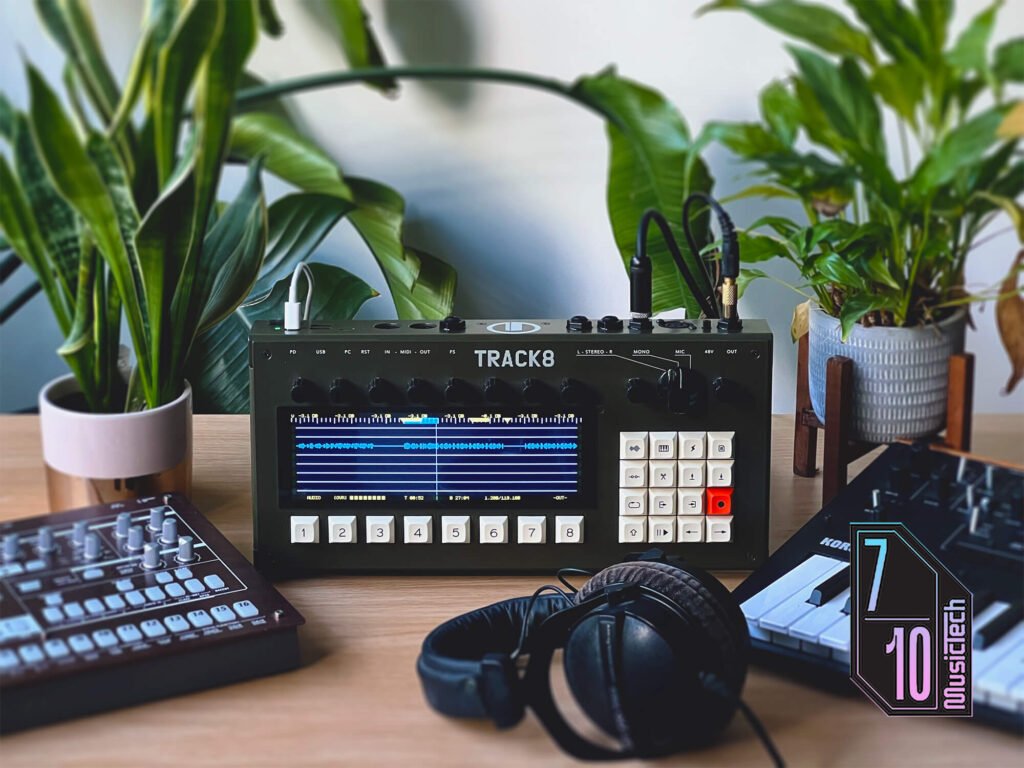

£1,580, thingstone.com
‘DAWless’ has become a slippery term. Sometimes it means a table full of hardware; other times, a DAW-like experience compressed into a standalone device. Either way, it’s usually about stepping away from the computer in favour of a more hands-on, present approach to making music.
That setup is immediately gratifying — until the point where you need to record something, and a promising loop collapses into cable-swapping, menu-diving, or another evening in the DAW.
Thingstone’s Track8 might bypass that bottleneck. Inspired by yesteryear’s eight-tracks, it exploits the immediacy of tape workflows while keeping the computer out of the room for as long as possible. That prospect is compelling enough for the first batch to have sold out, but can it cement Track8 as a permanent studio fixture?
First impressions of Track8
Arriving in a Peli-style hardcase, Track8’s olive drab chassis and utilitarian keycaps feel more Cold War bunker than modern recording device. The vintage affectation extends to the screen, featuring a toggleable CRT-style filter.

Given that DAWless is partly about escaping screens, Track8 strikes a convincing balance. The display is large enough to read at a glance, but it’s not imposing. It’s touch-sensitive too, though only for carefully chosen tasks like naming tracks and drawing automation.

Physicality is another major part of the DAWless appeal, swapping mouse clicks for dedicated knobs and buttons. Track8’s mechanical keys feel excellent, to the point that tapping them is mildly addictive. It’s instantly rewarding to use a device with this much personality.
Recording with Track8
I plug my guitar into the mono input and create a new project, which is automatically titled ‘LeanIntoMist’ by the playful name randomiser. Track8 is straightforward enough that I can get going without a manual, laying down guitar atop a drum loop imported from my USB stick.
My guitar takes aren’t particularly sharp, and without modern DAW tools like warping or tuning, nailing the performance matters a lot more. After using punch-in/out to mop up a few mistakes, I discover Track8’s varispeed—set by pitch or percentage—that makes difficult parts easier to track.
Varispeed is also a sound design tool in its own right. I speed the project up, record a transposed guitar line, then slot it down and repeat the process in reverse. Returning Track8 to its original tempo retunes everything back to baseline, but leaves behind a subtly warped, tape-like character.
Endless overdub is another tape-inherited trick. Setting it up is slightly convoluted, requiring punch-in/out to be enabled—recording stops at the end of the loop by default—but once configured, it’s one of Track8’s most immediate creative modes.
I use it to record lush pad chords with a monophonic synth before adding varispeed and effects (more on those later):
Track8 includes stereo jacks alongside the mono one, and an XLR input with phantom power and preamp, but you can only use one at a time, and the stereo input can’t be split between two tracks.
That feels like a missed opportunity on a machine otherwise tailor-made for capturing small hardware jams, minimally mic’d drum kits, or rough guitar-and-vocal demos. Although, external class-compliant audio interfaces can expand inputs/outputs via USB-A to enable simultaneous multitrack recording.
Editing audio and MIDI with Track8
Track8’s tape-style workflow also extends to editing, at least for simpler arrangement tasks. You can create slice markers, then cut or copy each designated section to paste it elsewhere in the timeline. In no time at all, I escape eight-bar purgatory in a process that’s both quick and satisfying.
More granular audio editing is possible, but it requires wrangling multiple controls: start and end points, cursor scrolling, grid size, and so on. I try to chop a drum break into a new beat, but finessing individual hits into place is too slow-going. Editing recorded MIDI is even more fiddly, and is not Track8’s forte.
One more creative editing tool is clipboard mod. After recording eight bars of my Electribe ER-1, I copy sections to the clipboard and apply stutter, reverse, and downsampling effects before pasting them on the timeline.
The results are more performative than polished, but that suits the device. It’s a quick, dirty way to inject variation, and things can get quite extreme:
Applying effects with Track8
Track8 includes a considered set of essentials: per-track EQ and compression, plus sends for delay and reverb. These fundamentals can take a mix surprisingly far, turning a scrappy arrangement into something relatively fully formed.
Delay and reverb settings are global, and both effects are tools for mixing more than sound design. The former is fairly simple, capping out at 350 ms, with no way to set dotted notes unless you calculate the time manually. As for reverb, four flavours provide ample spatial character.
Automation is one of my least favourite DAW chores, but Track8 makes it feel unusually approachable. It’s drawn freehand via the touchscreen, or linear changes can be entered manually with the encoders. However, ramping curves aren’t available.
Track8 is well-equipped on the mastering side, too. The Drive control glues everything together, while low/high gain controls add punch and sparkle in tandem with the stereo enhancer. I quickly dial in my guitar-and-drums sketch, resulting in a bounce that sounds remarkably robust for about 15 minutes of recording and mixing.
Once you’re ready to export, Track8 can bounce a stereo mix or full stems to a USB stick or the internal drive, which is accessible on computers via USB-C. The one thing I’d love here is a fade-in/out option for the master. For now, you can achieve this by automating individual track volumes.
Should I buy Track8?
Track8 occupies an unusual space. Its feature set is deliberately focused, yet its price puts it far above most standalone recorders and even MPC-style workstations.
Without using an interface, the limited inputs and outputs are perhaps the biggest flaw. It’s hard to overlook given Track8 costs £1,580, removing the possibility of out-of-the-box multitrack recording on a device that otherwise seems perfect for the job.
However, the more time I spend with Track8, the more natural it begins to feel, and capturing ideas without the usual DAW-based faff is liberating. It isn’t perfect, especially once you explore more advanced functionality, but it delivers exactly the immediate, distilled recording experience it sets out to provide.
Keep in mind, this is a boutique product. Thingstone mastermind Collin Raddatz assembled the first batch by hand in Weingarten, Germany. He’s also continuously improving the platform: users can request new features via the Track8 GitHub, many of which have been implemented since the device launched.
Ultimately, Track8 is not the most flexible way to record without a DAW, and it’s certainly not the cheapest – if you’re on a budget, classic digital or cassette multitracks from the likes of Tascam or Zoom offer their own nostalgic workflows for around £200.
Physically though, the device is a joy to use, and over time, its creative influence becomes progressively powerful. Rather than endlessly tweaking parameters and editing takes, I find myself listening harder, playing with more intent, and simply creating faster. The focus is part of the product – and for the right setup, it may be Track8’s most valuable feature.

Key Features
- Up to 8 audio tracks (32-bit float WAV) and 8 MIDI tracks simultaneously
- Mono and stereo line inputs plus XLR mic input
- Emulates tape workflow with punch-in/out
- Level, pan, mute, EQ, and compression per track
- Delay, reverb, and mastering effects
- USB for connecting class-compliant interfaces, memory sticks, and MIDI devices
- Export stereo mixdown or stems
- 19.05 cm x 6.35 cm touch-sensitive screen, plus encoders and mechanical keys
- 120 GB of internal storage
- Comes in a Thingstone-branded Peli-style hardcase
- Dimensions: 34 cm x 17 cm x 6.1 cm
- Weight: 1.5 kg
The post Thingstone Track8’s tape-style workflow is almost the perfect DAWless recording solution appeared first on MusicTech.