
News
I’ve finally found a unique reverb in Arturia Rev Ocean

€49, arturia.com
Knowing which reverb to use in a given situation, not to mention how to sculpt the effect to fit perfectly into the mix, is an art. However, what’s complicating matters is the sea of reverb plugins currently available. Too many just rehash the same reverb algorithms developed for classic digital outboard, or are yet another convolution-based rendering of an acoustic space or vintage electro-acoustic reverb generator. Either way, it all starts to get rather boring.
Arturia’s Rev Ocean promises a tantalising route through this quandary. It features an algorithmic engine able to deliver a wide gamut of reverb types, and additional processing stages built right in that would usually require complex processing chains and routing. It could be the alternative to the scores of Lexicon clones and EMT emulations that I’ve been looking out for…

In what ways does Rev Ocean keep things simple?
The more advanced and powerful reverb plugins out there tend to display an abundance of parameters with which to shape every tiny detail of the effect. This is all well and good if you have the patience to actually want to shape those details, but the absence of such minutia from Rev Ocean’s interface is instantly inviting. More importantly, I quickly realise this clean interface doesn’t particularly limit the plugin’s versatility.
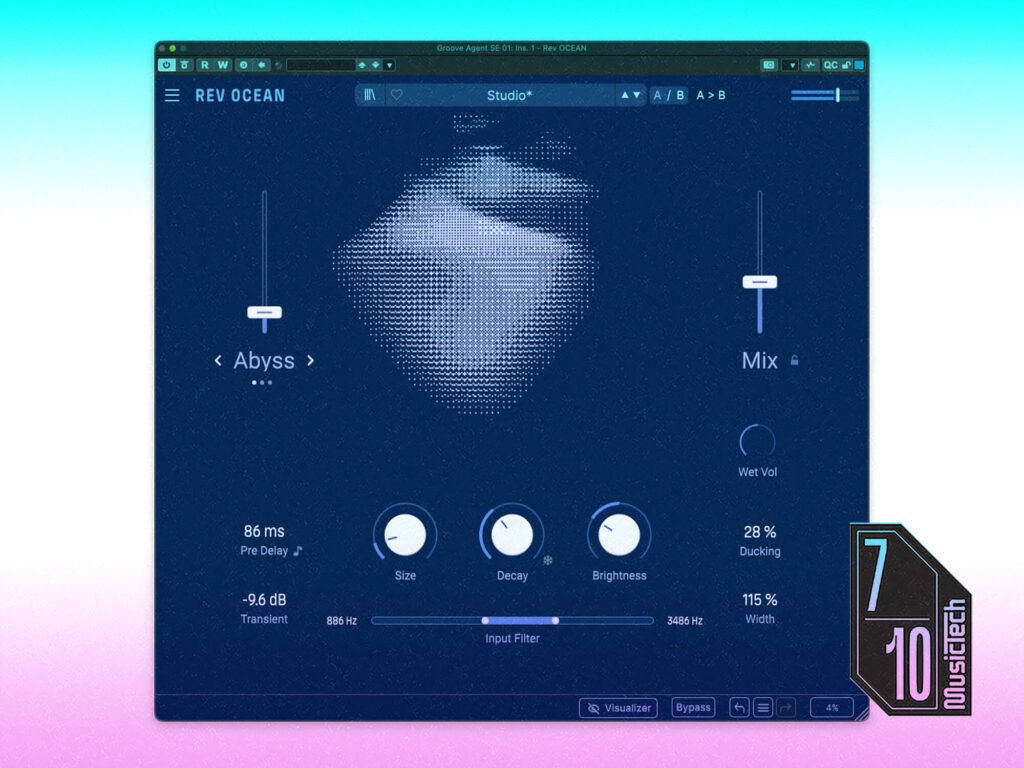
Ignoring for a moment the central, water-like visualisation, my attention is immediately drawn to a set of three large-ish rotary controls sat below said visualisation. These control familiar parameters of Size, Decay and Brightness, and function exactly as you would expect.
The Decay dial is accompanied by a Freeze button that, when enabled, instantly flips the Decay to its maximum setting, forcing the current reverb to continue indefinitely, while also muting the input to prevent new reverberations from being generated. The button has a latching behaviour, and so has to be pressed a second time to disable it, but I would much prefer the switch to be momentary, all the better for jamming with and creating spontaneous effects. At the very least, there should be a choice between latching and momentary behaviour.
Below these dials is a slider that controls the input’s high- and low-pass filters. Dragging either end of the slider adjusts the corresponding filter’s cutoff, leaving a central filled area that acts as an intuitive representation of the filter setup. My only gripe is that the filters can’t be adjusted simultaneously by dragging the central area of the slider.
The only other prominent controls are a pair of faders sat either side of the visualisation. The left-most slider controls the plugin’s Macro Modes feature, which I’ll come back to in a moment, while the right-hand Mix fader controls the wet/dry balance. This can be locked so it isn’t changed when presets are loaded, which is particularly convenient when using Rev Ocean as a send effect.

Controlling the details with Rev Ocean
Rev Ocean’s remaining controls are less prominent – not in any way hidden nor inaccessible, but backed-off visually to indicate their secondary, albeit important, role.
For example, positioned just below the Mix fader is a rotary that trims the wet signal’s volume by up-to ±24 dB. This is an uncommon control whose usefulness isn’t immediately apparent. However, as I discover, when used as an automation and/or modulator destination, it’s ideal for adding dynamic movement to the reverb.
The remaining parameters are presented simply as value fields. Here we find the vital Pre Delay setting, which can be defined in milliseconds or synced to the host’s tempo, a built-in ducker which reduces the reverb’s volume while the direct signal is sounding, a stereo width control, and a transient shaper. This last is particularly useful, reducing transients in the input signal in order to reduce or eliminate the sometimes-undesirable cracks and snaps they can cause in the reverb sound.

What are Macro Modes, and what’s with the watery visualisation?
Macro Modes are the secret to Rev Ocean’s ability to move beyond plainer types of reverb into more creative realms. These apply a chain of effects to the reverb tail, shaping and processing it in different ways depending on which of the three available modes is selected.
Abyss mode applies the most sonically obvious processing, adding to the regular reverb signal multiple parallel reverse reverbs, some shifted up or down in octaves. The result is a shimmering, shifting reverb that can bring solo instruments and pads to life, and can sound surprisingly effective on snares.
Foam is harder to characterise; it turns the reverb tail into a dense, growing wash of resonant reflections that are somewhat tuned to match the source signal. I find this is most useful as a special effect, adding a dramatic flourish after a hit, note or riser.
The third mode, Tide, applies multiple slow, out-of-sync filter sweeps to create a phaser- or flanger-like effect within the reverb tail. The shifting, washing effect is somewhat unpredictable, and sounds particularly pleasing on pads.
Turning up the Macro Mode fader increases the prominence of its effect, and can also subtly impact details of the underlying processing. Similarly, and intriguingly, the other reverb settings also have an impact on the Macro Mode, as do the dynamics of the incoming signal. All told, this allows you to produce some remarkably complex, detailed and creative reverb effects with minimal effort.
The ripples and swirls of Rev Ocean’s visualisation, looking like light reflecting on water, needs a quick mention. It looks nice enough but, unfortunately, isn’t responding to the incoming signal; rather, it’s intended only to represent the plugin’s settings. It does this surprisingly well, but once you’ve got your reverb dialled-in the animation is little more than wasted CPU cycles, so it’s good that there’s a dedicated button for disabling it.
Finally, Rev Ocean comes with a sizable collection of presets, many of which showcase the Macro Modes system. The plugin also has a full undo/redo system that includes a popup history panel for quickly stepping through multiple undos/redos in a single click.

Is Rev Ocean worth getting?
Most important of all is how Rev Ocean actually sounds, and I’m pleased to report there are no deficiencies in this department. The reverb engine doesn’t contain a choice of algorithms as you may find in other reverbs, but the reverb can moulded and shaped with ease, and is rich and detailed from initial onset to the dying moments of the tail, so I really don’t miss those traditional options of hall, room, chamber, and so on.
Also, while I was initially dubious about the Macro Modes system, worried it may be too static and contrived, it turns out the Macro Modes provide a ludicrously easy way of rustling up creative and striking reverb effects.
I like Rev Ocean a lot, and one of the things I like most is that it isn’t yet another Lexicon or EMT emulation, nor yet another convolution engine with accompanying impulse recordings. I’ll still be using those other reverbs, but only once I’m sure Rev Ocean won’t do a better job with less effort.
Key Features
- Algorithmic reverb plugin (VST, AU, AAX and NKS)
- Windows 11+ / macOS 11+, Intel or Apple Silicon
- Macro Modes for processing reverb tail
- Transient smoothing, ducking and stereo width control built in
- Low-pass and high-pass input filters
- Full undo/redo system with history panel
- A/B switching and settings-swapping
The post I’ve finally found a unique reverb in Arturia Rev Ocean appeared first on MusicTech.