
News
Thephonoloop Outlines review: Much more than a paint-by-numbers granulator

$144 / €120, thephonoloop.com
Have you ever had that feeling that something’s missing from your sound? Maybe the bass doesn’t have enough punch or the highs are lacking a certain sparkle? Well, Outlines, the new plugin from Thephonoloop, made me realise that what was missing from my sound was a deer call.
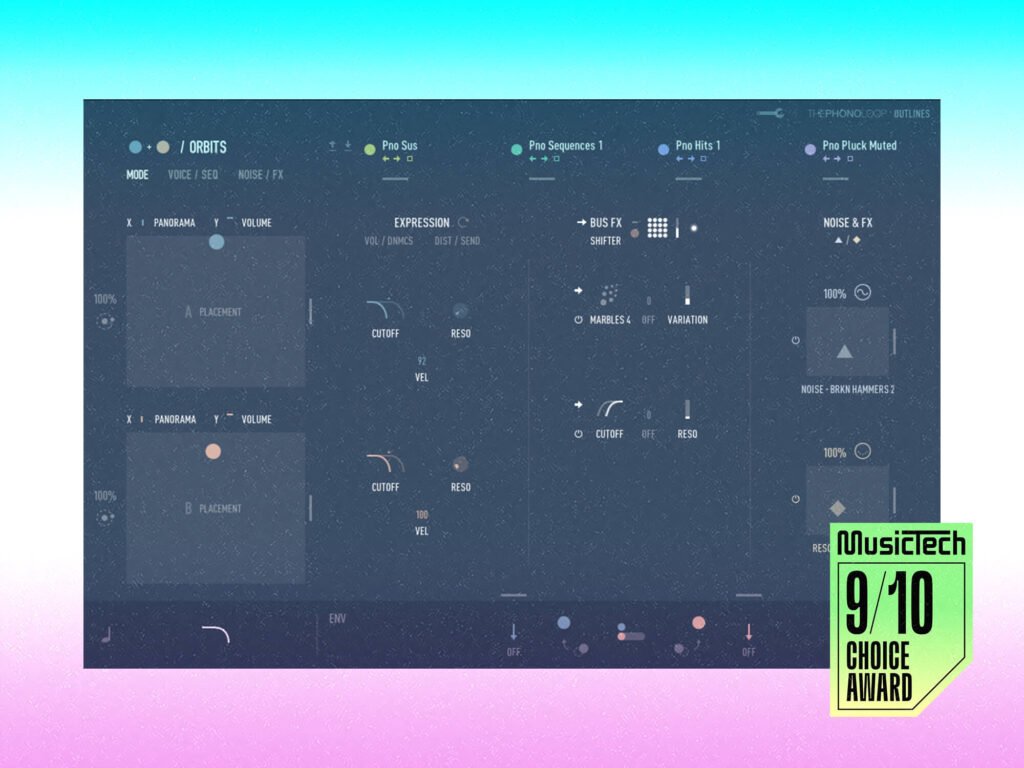
Billed as a quick-fire way to sketch out the contours of a musical idea, this sound design-focused instrument packs together two granular engines, an incredibly well-rounded collection of samples and upfront modulation controls via four XY pads.
Despite its name, this is no paint-by-numbers plugin. Each preset can be pried open and explored, using a modular workflow to sculpt the sound in much finer detail.

Making granular synthesis accessible with Thephonoloop Outlines
Anything that simplifies granular synthesis is welcome in my books. With complex panning in three dimensions, samples split into tiny grains, and wild pitch shifting – I don’t always wrangle a good sound from my experiments.
Yet, with Outlines, I rarely hit a dead end. Built on two independent layers, each running a separate granular engine, Outlines channels these elements into playing modes fine-tuned for leads, pads and drones, and spatial panning.
Further sub-operating modes, such as Echoed, Chasing or Flowing, for example, give you a quick switch for applying a different kind of motion to your sound. There’s also a well implemented 16-step polyphonic sequencer, so if your production needs a bit of flux or flow, and you don’t want to get into nitty-gritty audio programming, Outlines has you covered.
Admittedly, it takes me a while before the color coding filters into my brain, owing to the minimalist user interface and the aesthetic choice to use low-contrasting pastel colors. But once you get the hang of it, re-routing controls isn’t difficult.
On a broad level, Outlines is a natural fit for cinematic music and sound design. But I wouldn’t suggest pigeon-holing this plugin. I can easily imagine porting some of that film magic over to music production, particularly ambient and experimental genres. Ultimately, Outlines makes granular synthesis a whole lot more accessible. Instead of getting lost in a sea of microscopic grains, this plugin presents a safe harbour where anyone can begin exploring a new sound.

Outlines is a feast of sonic delights
But of course, what is a granular engine without something to granulate?
Outlines covers a lot of ground in its library with over 2500 samples on hand. Beautifully captured classical instruments are complimented by synthesizers and further filled out by an endlessly fascinating collection of nature and noise samples; from deer calls to vinyl, coffee machines, styrofoam, church bells and many more in between – not to mention one set of samples entitled Piano Abuse.
Guitar, violin, percussion and piano are a few key sounds that form the Outlines palette, but what makes these instruments interesting is that more than just their playable notes were recorded. One of my favorite presets is Inside Piano, where you can hear the piano strings being struck, or percussive tapping on the piano frame. Throw in some orbital panning and you’ve got a recipe for an anxiety-inducing psycho-thriller, just like that.
Beautifully layered together, these elements often occupy an uncanny space in the imagination, leaving me not quite sure what I was listening to. Threaded throughout many of the presets are little sonic oddities that add a whole lot of extra character; air, creaks, scrapes, taps, foley, environmental sounds, and room noise. They all sit satisfyingly close to the surface, and give a bespoke feel to the library. Providing a nice sonic glue across the catalogue is the seductive warmth of tape loops and analogue processing.
Many of the sounds, in fact, were captured at 192 kHz, which has the added benefit of preserving audio fidelity when pitch shifting, which is especially necessary for granular processing. To this end, I never once noticed any glitches when processing sounds, even when playing the XY pad and modulating sounds in real-time.

Expression is the name of the game
It’s hard to miss the point that Outlines make by putting four XY pads on the frontend: this plugin is all about expression. And it’s the great selection of sculpting features here that really lifts this instrument up.
However, the unusual thing about this plugin is that the exact expression settings that are available to tweak, vary depending on the presets. Moreover, it’s worth noting that you actually can’t change what’s assigned to each axis on an individual basis, you have to choose from the suggested pairings, which might disappoint some hard core instrument builders. But for what it’s worth, I certainly don’t want my time to be consumed by routing when searching for the sound I want.
My favorite starting point quickly becomes the two XY pads for noise and effects. This is where I can bend the speed of rhythmic samples and get strange effects from pitch shifting. Under the surface, each pad can be reassigned samples and effects, and here is another area where things have been simplified by listing useful combinations of parameters like Volume and Pitch, or Time and Feedback.
One standout feature is the collection of effects grouped under the title Shifter, which use convolution processing to produce a weird and wonderful overlay of texture. There are three main types called Shifter, Blur, and Marbles – which do somewhat describe the effect they have.
At every turn I stumble across yet more expressive tools that have been baked into the instrument, including one with the tasty name Sprinkle. This control sets the time it takes for a regular grain to become a sprinkle, which as its name may or may not suggest, sounds like a tiny fragment of the sound briefly ‘popping’ into the mix. You can further finesse these sprinkles as it comes with its own volume, effects and distortion settings.

Ideas worth keeping
Stepping back to appreciate what Thephonoloop has built with Outlines, I’m seriously impressed. For people who need high-quality sounds quickly, this is a genuine resource, shortcutting the sound design process to get you right to the good stuff. What matters here is that the outlines that Outlines provides are easy to run away with. And you get just enough control to steer things in an interesting direction.
This plugin’s modular design means you can peel back elements of a preset, probe various settings, without the whole sound collapsing. I rarely spend a lot of time flipping between presets, because one preset alone keeps me fascinated and enthusiastic about manning the controls.
Before you know it, you’ve departed the preset and have begun building out something unique.
Key features
- 2,509 sample library including instruments, synthesizers, field recordings, and foley
- 438 thoroughly crafted presets for Native Instruments Kontakt Player
- 2 independent layers, each running a separate granular engine
- 4 XY pads for filtering, effects, noise and modulation.
- 4 sample slots with the ability to load user files
- A range of different operating modes including singular, duets, sculpt, lengths and orbits
- Two polyphonic 16-step sequencers, used for both traditional sequencing and modulation
- Effects include flanger, tape emulation, reverb, delay and more
- XY pads come with a range of modulation options for quick sound design and ideation
- The Shifter granular engine comes with a number of custom effects presets
The post Thephonoloop Outlines review: Much more than a paint-by-numbers granulator appeared first on MusicTech.